Change Log:
Changes: 2022-07-29
New: Abrilada, Yuflyma, Simlandi
Code Change: Hyrimoz
Changes: 2022-04-29
New: Revlimid
New: Riabni, Baqsimi, Atectura Breezhaler, Enerzair Breezhaler, Ilumya
Code Change: NovoRapid
Moved to LU: Lantus
Removed from LU: Nix
Changes: 2021-12-17
New: Beovu, Olumiant
New Codes: Riximyo 616, 617
Code Change: Harvoni, Sovaldi, Epclusa, Vosevi, Zepatier, Maviret
Discontinued Code: 486 (Sovaldi)
Changes 2021-04-05:
New: Amgevita, Hulio, Idacio, Hadlima, Hyrimoz
Note Hyrimoz has similar but different set of codes
Code Change: Brenzys, Erelzi
New: Monoferric, Agrylin, Avsola
Moved to LU: Humalog
Changes 2020-10-25:
New: Envarsus, Xeljanz 10mg
Code Change: Xeljanz 5mg, Truxima, Erelzi
Changes 2020-08-23
New: Ruxience, Riximyo, Keppra 1000mg
New: Clinoleic 20%, Triamcinolone Hexacetonide Inj Susp
Codes removed: Arimidex, Aromasin, Femara
Changes 2020-05-04
New: Xarelto 2.5mg, Vyzulta, Skyrizi, Intuniv XR, Sporanox Oral Sol,
Valcyte Oral Sol, Truxima, Sublocade, Probuphine
New Codes: Valcyte Tab
Discontinued Code: Fibristal 467
Cumulative Changes 2019-11-04:
New: Erelzi, Vosevi, Baraclude, Heptovir, Viread, SMOFlipid,
Taltz, Repatha, Mictoryl Ped, Ciprodex, Campral, Revia, Dysport,
Glatect, Reflexis, Lancora, Brivlera, Zithromax, Maviret, Praluent,
Siliq, Lixiana, Izba, Akynzeo, Xeljanz XR, Trelegy Ellipta, Vancocin
Code Change: Prolia, Aptiom, Fycompa, Vimpat, Aclasta, Daklinza,
Epclusa, Harvoni, Sovaldi, Zepatier, Diflucan, Pentoxifylline, Urso,
Keppra, Inflectra, Cellcept, Erelzi, Fibristal
Code deletion: Cipro, Levaquin, Avelox, Valtrex, Cytovene
Cumulative Changes 2017-11-30:
New: Simbrinza, Aptiom, Fibristal, Duaklir Genuair, Inflectra,
Inspiolto Respimat, Zaxine, TOBI Podhaler, Cosentyx, Xeljanz,
Sunvepra, Daklinza, Zepatier, Harvoni, Ibavyr, Sovaldi, Epclusa,
Entresto, Brenzys, Neupro
Code Change: Xarelto, Eliquis, Neupogen, Fentanyl, Breo Ellipta,
Eylea, Brilinta
Status change to LU: Keppra, Versed
Palliative care: Phenytoin, Metoclopramide, Furosemide, Dimenhydrinate,
Diazepam, Lorazepam, Buscopan, Scopolamine
Update Aug15: New dose: Innohep
Update Jul15: New: Eylea; New code 462 & revised txt: Lucentis
Update Jun15: New: Anoro Ellipta
Update May15: New: Inspra, Ultibro, Myrbetriq; New Code: Xeloda 461, Botox 460
Update Apr15: New: Ragwitek; New dose: Creon 6; Revised txt: Oralair
Update Mar15: New: Breo Ellipta
Update Nov14: New: Jetrea
Update Sep14: New: Emend Tri-Pack; New Codes: Zofran 454; Changed Code description: Xarelto 444
Update Mar14: New: Oralair
Update Feb14: New: Fycomba
Update Nov13: New Codes: Eliquis 433 434; Aromasin 450
New Edition 42 Updates now use Month-Year instead of letter sequence
Update AY: New: Effient
Update AX: New: Eliquis
Update AW: New: Neupogen
Update AV: New Codes: Xarelto 15/20mg
Update AU: No Change
Update AT: New: Brilinta, Onbrez Breezhaler, Toctino, Toviaz
Update AR: Change to General Benefit: Plavix; New Name: Pradaxa
Update AQ: New: Rapaflo; Code Change Xatral
Update AP: No Change
Update AO: Botox New Code 440; Changed to General Benefit: Flomax CR
Update AN: Lucentis New Code 439
Update AM: New: Suboxone
Update AL: Stelara code description change on weight & dosage
Update AK: Aclasta new code 436
Update AJ: New: Visanne, Xarelto 15/20mg; Change to LU: Xarelto 10mg
Update AI: Move back to LU: Premarin; Code Change: Xeomin
Udpate AG: New:Pradax, Vimpat
Update AF: No Change
Update AE: Delisted: Oxycontin; New: Prolia, Zenhale, Fragmin 7500IU
Update AD: New: Lumigan RC 7.5ml Pk
Update AC: New: Enablex, Trosec, Vesicare; Code Change: Xeloda, Detrol
Update AB: New: Enbrel Sureclick; Changed to General Benefit: Zovirax, Lamictal, Topamax Tab
Update AA: New: Champix Starter Pk; New Code: Temodal; Changed to General Benefit: Arava
Update Z: New: Champix,Zyban,Silkis; New Code:Fludara; Changed to LU:Aranesp,Eprex
Update X: New: Xeomin; Changed to LU: Lucentis
Update W: Advagraf 3mg ER, Tamiflu 30,45mg
Update U: Changed to LU: Humira, Enbrel; New: Stelara, Lumigan RC, Stalevo 75&125; Changed to General Benefit: Neurontin
Update R & S1: New: Azarga, Innohep 2500IU/0.25ml Inj Pref Syr
Update P & Q: New: Relenza, Cosopt-Preservative Free
Update O: New Code: Botox 412,413; Code Change: Xeloda 360
To avoid confusion, the two separate Losec entries/DINs have been merged.
Update K & L:New: Testim, Travatan Z
Update I:New & Change code: Plavix
Update H: New: Advagraf; Prograf 0.5mg; Delisted: Premarin 0.3mg, Premplus
Update E/F/G: Xeloda new code (409); New: DuoTrav, Stalevo
Update A Changes: Humalog & Humalog Mix25 Changed from LU to General Benefit
|
My simple
BMI Calculator
is mainly for my own use when doing diabetic flow sheet. It converts
metric to/from imperial units, you can also freely mix and match
metric/imperial units for weight and height; and it gives you a target
weight to achieve BMI of 25. It can be used both on-line and off-line.
Give it a spin. It should work on mobile browser as well (same requirement
as LU code lookup page). You can follow similar instructions
here for offline use.
|
The Mobile browser version is designed to work better on small screen.
Here are some instructions of how to access the page
offline. I would also like to hear feedback if it works well on your
particular phone, or non-windows mobile device. To ease entry of the
URL in mobile device using less keystrokes, I have setup this redirection
URL for the mobile version page:
http://lucodes.ca/m
Palm Corner (Legacy)
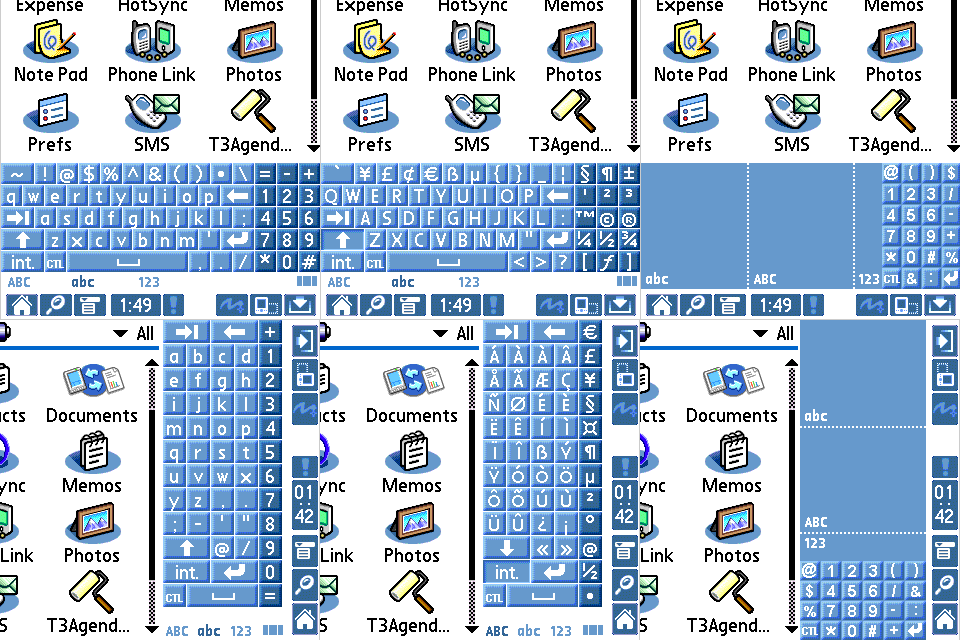
 OriginalPlus: Enhanced Extended Keyboard & VG for Palm Tungsten T3,
T5 & LifeDrive DIA
OriginalPlus: Enhanced Extended Keyboard & VG for Palm Tungsten T3,
T5 & LifeDrive DIA
Numeric Keys and Keypad enhancement in keyboards and virtual graffiti input
area.
It is installed as a DIA (Dynamic Input Area) skin. However,
unlike most other skins, this design retains the original look and
it is mainly for functional enhancement. It is provided as freeware.
You need to use a skin manager such as
mySkin (T3, T5 & LifeDrive) or
T3AgendaBG (T3 only) in
order to load and use this keyboard.
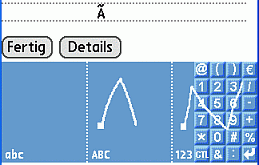
Screen capture from Simulator which does not display the BlueTooth icon.
The icon is present when installed in your Palm.
Click to download:
Features:
- Numeric Keys and Keypads enhancements for keyboards and virtual graffiti input area.
- This is not a hack, it is loaded in priority over the original DIA resource file in the ROM.
It should be compatible and work seamlessly with most programs.
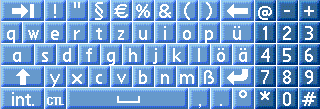
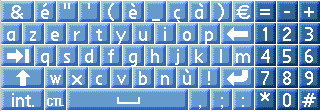
- Choice of English (US), German and French Keyboard Layout.
- Most of the supported character sets/symbols now accessible.
- Two Tone Keyboard color
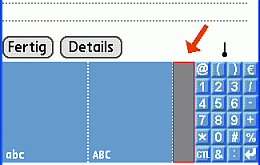
- An area of numeric graffiti input area is maintained next to the keypad to
facilitate foreign characters accent and symbol graffiti input.
- "CTL" command key added in all keyboards and keypads.
- Status bar dark background removed for a cleaner look.
- Consistent key buttons position for German and French layout when switching between normal and
international keyboards.
Installation:
- Unzip the downloaded file into a temporary directory. The files are located under three folders:
English_US, Fran?ais and Deutsch for the three different language layout.
- For English(US) version:
- "OrigPlusXXUS.prc" must be used with
mySkin or
T3AgendaBG;
This is easiest and you can select and use different keyboard layout or other DIA skins at any time.
For T3AgendaBG users, you probably need to soft reset after activation the new keyboard, and you need
to do the same after switch back to the original keyboard.
This should not be necessary for mySkin users.
- Advanced T3 users only
(StatusBarResources will NOT work with T5 and LifeDrive - it will crash)
"StatusBarResources.prc" does not require any 3rd party software, after
hotsync to your Palm, you will be prompted automatically for a reset;
however, this one is more difficult to uninstall, as it requires a 3rd
party program to delete the file (FileProg or Filez will work; FileProg
seems to work better as deletion by Filez directly would give you an
error, which can be eliminated by doing a warm reset first). So if
you aren't sure or not familiar with these programs, use the
mySkin or T3AgendaBG version.
- For German and French version, install mySkin or T3AgendaBG
and OrigPlusXXDE.prc for German Keyboard or OrigPlusXXFR.prc
for French Keyboard. T3AgendaBG users may need to soft reset after
activation, and do the same when you switch back to the original one.
This is not necessary for mySkin users.
- I cannot be held liable if it causes error or data loss in your Palm. I have tested it in my T3
and simulator and it works well. But conflicts with some programs is possible; so use at your own risk :-)
- Thanks to DomG and Festus440 for their excellent tools to create this skin.
Thanks to Toem for his excellent T3AgendaBG skin manager and for testing the German keyboard layout.
Deutsch
Fran?ais
Tips:
Freeware:
This is provided as a freeware. But if you like it, you may donate to
your favourite charity and drop me a note about it :-)
History of Changes:
-
2005-09-28
Instruction changes only, for T5 & LifeDrive compatibility using mySkin.
Programs unchanged.
-
2004-03-09 v1.1
Added German and French Layout
Removed foreign characters from English_US layout
Added many more symbols from supported character sets
Added two tone keyboard
Fixed "ABC" "abc" and "123" icons position to be consistent between all the keyboards.
-
2004-02-26 v1.01
Forgot to put in "(" ")" brackets in main portrait keyboard.
1/4 and 1/2 symbols moved to "int." keyboard.
Reduce duplicate characters in "int." keyboard.
-
2004-02-25 v1.0
Pentax IR Remote database for Palm (Legacy)
NoviiRemote database file
for Pentax IR Remote. To download,
CLICK HERE